
Follow these steps to find your Log and/or Config files:
- Open CORSICA
- Go to Help > Show Log File / Show Config File
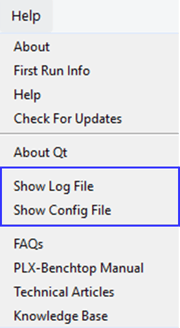
- A File Explorer window will open, where you can find:
- Config file: plastometrex_gui_config.json
- Log files: date_timeplastometrex_gui.log
If you are unable to open CORSICA, you can still access the Log and Config files directly via File Explorer:
- Config file: C:\ProgramData\Plastometrex\Corsica
- Log files: C:\ProgramData\Plastometrex\Corsica\log