
Timeout errors are shown in CORSICA as the following:
- Load cell reading too old
- Actuator reading too old
- Profilometer reading too old
These errors are related to how long the computer waits while expecting information from the PLX-Benchtop.
To reduce timeout errors, consider the following:
-
Ensure the PC is not running any other intensive apps.
-
Ensure the PC is restarted daily.
-
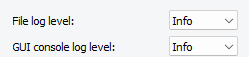
Ensure all logs are set to Info. Go to File > Settings > General and ensure File log level and GUI console log level are set to Info.
If the errors persist, please contact Plastometrex at support@plastometrex.com.